
Showing posts with label Android. Show all posts
Showing posts with label Android. Show all posts
How to Install Android in VirtualBox
http://www.howtogeek.com/164570/how-to-install-android-in-virtualbox/
iOS Hangouts now lets you call real phone number -- Android not far behind
http://www.androidpolice.com/2013/10/18/free-voip-calls-now-available-on-the-ios-version-of-google-voice-android-update-is-up-in-the-air/#comment-1088003493
Acer responds to market challenges, cutting tablet shipments by 60 percent

After total sales dropped by 29.2 percent last month, Acer has re-evaluated their tablet plans for the year with a 60 percent decrease in proposed shipments. The massive drop-off comes after missing their previous three quarterly forecasts and losing chief executive Gianfranco Lanci earlier this year. While the reduction in numbers seemingly comes as a bad omen, Chairman J.T. Wang expects Acer to rebound beginning in the third quarter.
Acer had already reduced its shipment forecasts for the second quarter, dropping figures by 10 percent. The company now expects second quarter results to come in slightly higher than forecast. The PC manufacturer hopes to sell 800,000 tablets in both the second and third quarters. Total shipments for the year are no pegged at 2.5-3 million units, down from the 5-7 million initially forecast.
[via Reuters]
How to Sync Google Chrome Bookmarks with Your Android Phone - How-To Geek

If you’ve got Google Chrome on your desktop and Google Android on your phone, you might be thinking… why can’t I use the same bookmarks in both places? Here’s how to sync your bookmarks between computers and also to your Android phone.
This article was written by Mitch Bartlett from Technipages.com, where he covers lots of tips for mobile phones.
Also if you use multiple browsers like me then you will want to go grab XMarks which will sync you bookmarks between major browsers like IE, Firefox, Chrome, etcetera. Then ChromeMarks will get all you synced bookmarks over to your Android device.

ES File Explorer Android App Review
The ES File Explorer Android App by EStrongs Inc. is an app that manages all the files on your phone and SD card. This file manager is packed with a lot of features other than just the file managing piece as its name indicates. The UI on this file manager in particular is clean and crisp and easy to navigate. The features are intuitive and allow for easy maneuvering between the phones internal files and the SD card. The features that are offered with this file are great features that logically should be included in all other file explorers on the market. Another great snippet of the UI is the ability to switch between grid and list view which makes it easier to find files and folders that are stored on either the phone itself or the memory card.
When you open up the parcels app the first thing you will notice is all of the files that are stored on the phone. Navigation between folders and the SD card and phone itself is very simple due to the toggle button included in the app. Included is a toolbar which will allow for multi-folder selection, searching of the contents, a previous file button, a help button, and a toggle between grid and list view. Embedded in the menu is all of your typical operations features (cut, copy, paste etc.) and a very cool feature called the manger/ The manger contains a task manger, app manager, security manager, bookmark manager, and an SD card analyst tool that will scan all the files on your SD card and list them in order by the size of the file.
Overall, this is an excellent file manger app that has a ton of extra features and is simple and intuitive. At the time of this review the ES File Explorer Android App is free. Thumbs Up.


When you open up the parcels app the first thing you will notice is all of the files that are stored on the phone. Navigation between folders and the SD card and phone itself is very simple due to the toggle button included in the app. Included is a toolbar which will allow for multi-folder selection, searching of the contents, a previous file button, a help button, and a toggle between grid and list view. Embedded in the menu is all of your typical operations features (cut, copy, paste etc.) and a very cool feature called the manger/ The manger contains a task manger, app manager, security manager, bookmark manager, and an SD card analyst tool that will scan all the files on your SD card and list them in order by the size of the file.
Overall, this is an excellent file manger app that has a ton of extra features and is simple and intuitive. At the time of this review the ES File Explorer Android App is free. Thumbs Up.


You Can Put a Working GPS Radio Inside Your Viewsonic G-Tablet

We’re not sure how popular this device is amongst the masses, but if any of you who bought it were annoyed by the lack of GPS radios inside, there’s a light at the end of the tunnel. Well, that’s if you’re a hardware engineer with some rad soldering skills. The guy who did it was even nice enough to whip up a parts list and some instructions. After looking at the list myself, I cowered in fear – it’s pretty semi-hardcore stuff. If you’ve got the technical knowhow and the ballz, head on over to XDA and get started.
Sourec: Engadget
Viewsonic G-Tablet
Viewsonic G-Tablet with 10 Multi-Touch LCD Screen Android OS 2.2 http://www.google.com/products/catalog?cid=12892906357056120944&source=shopper
Sprint Confirms Release Date for Motorola Xoom (WiFi Only Version)

It was only a few days ago I posted the leak on the Motorola Xoom WiFi only version being sold in stores May 8th. Well, it looks like our sources held up. Sprint, in a press release earlier today, has officially confirmed the May 8th launch date and a $599 price point. So, if for some reason you were waiting this whole time to pick up your own Xoom from Sprint and not say — the countless other retailers already selling the tablet, Sunday will be your lucky day! (Go get ‘em, Yarell!)
Now, Mr. Hesse. Lets talk about this 4G WiMax version…
Source Sprint / Phandroid
Target Cancelling ASUS Eee Pad Transformer Pre-Orders
If you’ve already pre-ordered the ASUS Eee Pad Transformer through Target and are waiting for the Android Stork to drop that baby on your porch – don’t get your hopes up. We’ve gotten several reports from readers claiming Target sent them an E-Mail indicating their pre-order is cancelled, citing inability to procure the device from their suppliers. We’ve got yet to verify, but enough tips have come in that we’re pretty confident it’s true.

This could be great news for ASUS if Target’s cancellation is due to demand largely outpacing supply with retail channels getting their stock units axed. Unfortunately, we learned yesterday that it’s more likely to a component shortage – ASUS doesn’t have the supplies they need to MAKE the darn things. I’m sorry to say that “sure thing” pre-order is good for nothing and you’ve either got to fight your way to finding another Transformer elsewhere or set your sights on something else.
Feel free to bitch about it in the ASUS Forum. We’ve got word into Target asking about details and will report back with anything of substance.
UDPATE: Here is the e-mail users are receiving

This could be great news for ASUS if Target’s cancellation is due to demand largely outpacing supply with retail channels getting their stock units axed. Unfortunately, we learned yesterday that it’s more likely to a component shortage – ASUS doesn’t have the supplies they need to MAKE the darn things. I’m sorry to say that “sure thing” pre-order is good for nothing and you’ve either got to fight your way to finding another Transformer elsewhere or set your sights on something else.
Feel free to bitch about it in the ASUS Forum. We’ve got word into Target asking about details and will report back with anything of substance.
UDPATE: Here is the e-mail users are receiving
Thank you for shopping at Target.com.
Unfortunately, the following item is not currently available from any of our sources.
Asus Eee Pad Transformer 10.1″ Android Tablet (TF101-A1) with 16GB Hard Drive, 1GB Memory – Black/Brown
We have cancelled this item from your order.
To view the current status and the costs associated with your order, please visit My Account (http://www.target.com/my-account).
Because you only pay for items when we ship them to you, your credit card has not been charged for this item.
Thank you for being a valued Guest. We hope you visit us again.
Sincerely,
Guest Service Department
Target.com
http://www.target.com
Tablet Showdown

Price?
Release Date Q2 2011 May
10.1-inch IPS touchscreenSlide-out QWERTY keyboard
Nvidia Tegra 2
Front-facing 1.2MP camera
Rear-facing 5MP camera
Android 3.0 OS (Honeycomb)
Optional 3G

Eee Pad Transformer
$399.99 w/o Dock
Release Date Q2 2011 March
OS Android 3.0
10.1-inch IPS Panel
Nvidia Tegra 2
Front-facing 1.2MP camera
Rear-facing 5MP camera
Android 3.0 OS (Honeycomb)
mini-HDMI port for external 1080p HD video
Optional docking station with a QWERTY keyboard
Charging Time via USB: 16hrs
271mm x 175mm x 12.95mm
Reviews: Anandtech
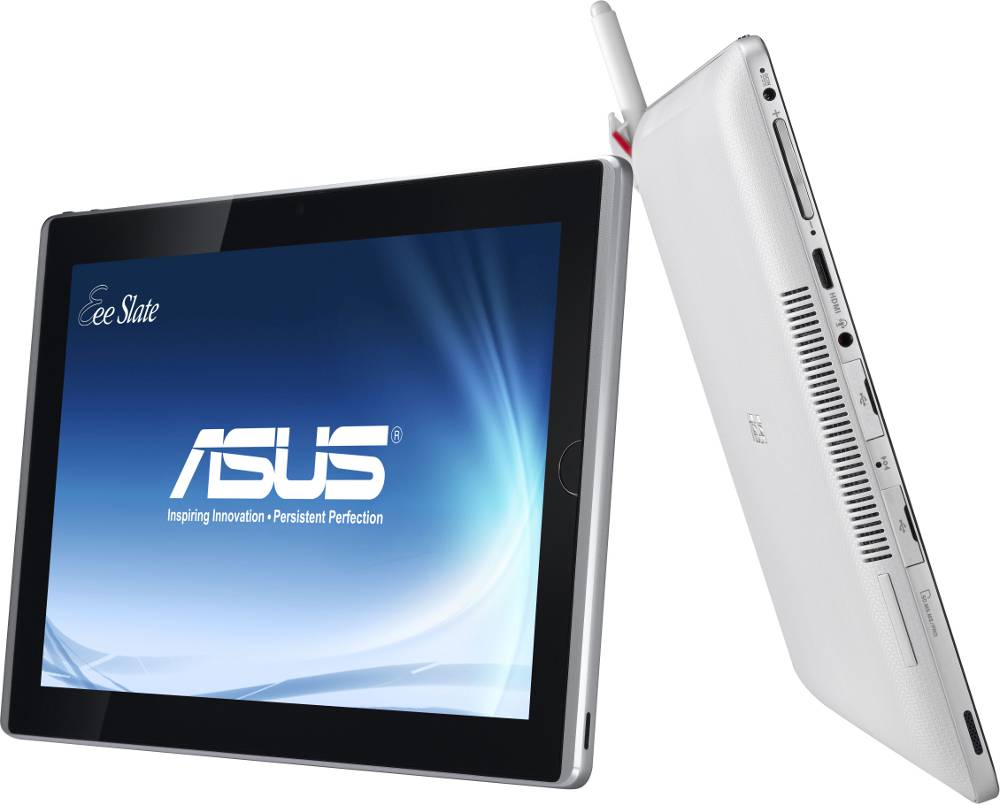
Eee Slate EP121
$1200
12.1-inch LED-backlit capacitive touchscreen
12.1-inch LED-backlit capacitive touchscreen
1280 x 800 resolution & 178-degree viewing angle
Intel i5 dual-core CPU
Windows 7 Home Premium
32 GB/64 GB of SSD storage (expandable via SDXC)
Up to 4 GB of DDR3 RAM
802.11n Wi-Fi
Bluetooth 3.0
2MP camera
2x USB 2.0 ports
Mini-HDMI port

Viewpad 10s
Release Date Q4 2010
$309.99 as of 4/20/2011
Dual Boot OS: Android 1.6 (2.2 Soon) / Windows 7
10.1" LED blacklit display with 1024x600
700:1 Contrast Ratio
Tegra 2 CPU 1.Ghz Dual Core
Cache 1MB
Cache 1MB
Wi-Fi N / Bluetooth 2.1
10.8" W x 6.7" H x 0.57" D
(275mm x 170mm x 16.5mm)
(275mm x 170mm x 16.5mm)
Weight: 1.93 lbs
1.3 MP Camera (front)
4 Hour Battery Life
Review: SteveChippy

Viewpad 10Pro
Release Date Q2 2011 (May)
$580 Price Estimate
Dual Boot OS: Android 2.2 / Windows 7
10.1" LED blacklit display 1024x600 Resolution
Oak Trail 1.5 GHz Processor
2GB RAM
Wi-Fi N & Bluetooth
1.3 MP Camera (front)
No Front Facing Camera
Adobe Flash
6 Hour Battery Life

Motorola Xoom
Android 3.0 Honeycomb
10.1" WXGA LCD Screen (1280x 800)
1GHz Dual Core
Wi-Fi N & Bluetooth 2.1
249.1 x 167.8 x 12.9 mm
10 Hour Battery Life
2 MP Web Camera
5 MP Camera

HP TouchPad
9.7" display (1024 x 768 screen resolution)
Colors: 262,144
dual-core 1.2GHz Snapdragon CPU
16GB / 32GB of internal storage space
Wi-Fi N & Bluetooth 2.1
GPS (3G model only)
Front Camera: 1.3 MP
Size: 9.45 x 7.45 x 0.54 (240 x 189 x 14 mm)
Weight: 26.10 oz (740 g)
Battery: 6300 mAh

Samsung Galaxy Tab 2
Android OS 2.3 (upgrade 3.0 Honeycomb)
NVIDIA Tegra 2 processor
1024 MB RAM
7″ 2048×1200 Super-AMOLED Display
3D Display
Camera: 8mp Dual LED flash.
Web Camera: 3mp
Wi-Fi N & Bluetooth 3.0
64 GB Internal Memory
| Tablet Specification Comparison | ||||||
| Apple iPad 2 | ASUS Eee Pad | BlackBerry PlayBook | Motorola Xoom | |||
| Dimensions | 241.2mm x 185.7mm x 8.8mm | 271mm x 175mm x 12.95mm | 194mm x 130mm x 10mm | 249.1mm x 167.8mm x 12.9mm | ||
| Display | 9.7-inch 1024 x 768 | 10.1-inch 1280 x 800 | 7-inch 1024 x 600 | 10.1-inch 1280 x 800 | ||
| Weight | 601g (WiFi only) | 675g | 425g | 730g | ||
| Processor | 1GHz Apple A5 (2 x Cortex A9) | 1GHz NVIDIA Tegra 2 (2 x Cortex A9) | 1GHz TI OMAP 4430 (2 x Cortex A9) | 1GHz NVIDIA Tegra 2 (2 x Cortex A9) | ||
| Memory | 512MB | 1GB | 1GB | 1GB | ||
| Storage | 16GB up to 64GB | 16GB + microSD card | 16GB up to 64GB | 32GB + microSD card | ||
| Pricing | $499 up to $829 | $399 | $499 up to $699 | $799 | ||
Asus Eee Slate $1189


Specifications
- 12.1-inch DisplayLED-backlit (1280 x 800)
- Intel Core i5
- 2GB DDR3 (expandable to 4GB)
- 32GB Solid State Drive
- Windows 7 Home Premium (64-bit)
- Wireless N and Bluetooth v3.0
- 2mp Camera
- Dimensions: 12.28 x 8.15 x .66 –inches
- Weight: 2.53 lbs
Gigabyte Cooking Up Dual-Boot Android/Windows 7 Tablets for Later in the Year

Add Gigabyte’s name to the list of companies having a go at making Android tablets with models due out by the end of the year. The Taiwanese manufacturer’s plans include 7 and 10-inch devices as well as a dual-bootable tablet featuring both Android and Windows 7 (the Windows-only S1080 is pictured above). These tablets should be among the first to utilize Intel’s Atom processor geared towards tablets, with the 7 and 10-inch models launching in July. They will run the increasingly outdated Android 2.2 and Android 3.0 Honeycomb respectively. The first two Android models will be followed in October by the dual-boot model.
The only other spec revealed is more a lack of spec: the devices definitely won’t have a USB port. While no price is set, Senior Vice President Richard Ma said the aim is to keep them priced below $400 US. Of the group, we are most interested in the dual-boot version, as the concept has been tried preciously and yet to really catch on on.
[via PCWorld]
Acer Announces the Iconia Tab A500 for $449.99 at Best Buy Starting April 24th

Acer has just officially announced United States availability of their Iconia Tab A500 tablet, a 10.1-inch 1280×800 Honeycomb affair. You’ll be able to pick this thing up from Best Buy for $449.99 starting April 24th presales start April 14th). It’s a WiFi-only model that’ll have 16GB of internal storage, 8 hours of battery life, front and rear cameras, an HDMI port, a microSD card slot and a six-axis gyroscope.
We also can’t forget that all-important Tegra 2 processor sitting inside. A 32GB version will come sometime further down the line, says Acer. Some accessories to accompany the tablet include a Bluetooth keyboard for $70 and a multi-media dock with an infrared remote for for $80.
Acer Iconia Tab A500 Tablet Super-Charges Mobile HD Entertainment,
Connectivity
First Acer Tablet with Android 3.0 for US Market Now Available for Pre-Order at Best Buy; Provides Superior Mobile Entertainment, Connection to Internet, Games, Movies, Social Networks
SAN JOSE, Calif., April 8, 2011 - Acer America today debuts the Acer Iconia Tab A500 in the United States and announced that it is available for pre-order online exclusively from Best Buy. The Acer Iconia Tab A500 is the company’s first 10.1-inch tablet running Android 3.0 (Honeycomb) in the new Acer Iconia family of tablets for North America.
The new Acer Iconia Tab A500 tablet enables customers to interact with and enjoy technology in ways that are both truly natural and exciting. The 10.1-inch multi-touch screen provides accurate finger-tip control for personal access to applications, games and entertainment. The tablet provides an enhanced level of performance with its NVIDIA Tegra 250 1GHz dual-core processor and integrated GeForce™ GPU that lets customers enjoy HD gaming, 1080p video and faster browsing, as well as running multiple applications and digital media playback at the same time.
Customers can take advantage of these capabilities with the new Android 3.0 (Honeycomb) operating system, which gives them the flexibility to customize their experience to suit their interests.
The Acer Iconia Tab A500 was built for usability on-the go. Its slim and modern aluminum design weighs only 1.69 pounds and measures only 0.52-inches thin. It also includes forward and rear-facing cameras for capturing videos and photos as well as video conferencing.
A Best Buy exclusive, the Acer Iconia Tab A500 with WiFi is now available for pre-order online at bestbuy.com and may be pre-ordered in stores beginning April 14. The Acer Iconia Tab A500 with WiFi will be available in stores and online beginning April 24. The Acer Iconia Tab A500 has a manufacturer’s suggested retail price of $449.99.
"Staying connected and entertained are firmly embedded as a part of our everyday lives - and the Acer Iconia Tab A500 does this and so much more in a performance-minded, sleek and stylish design," said Sumit Agnihotry, vice president of product marketing, Acer America. "This tablet absolutely delivers on the expectation that customers can be entertained, stay in touch with family, friends, colleagues and social networks, as well as keep up on the world around them in a way that is intuitive and fluid, and also incredibly enjoyable."
Best Buy’s vice president of computing, Jason Bonfig, stated, "Tablets are paving the way for people to enjoy a whole new form factor in entertainment and connection. We’re pleased to have Acer join our tablet selection and to offer our customers an opportunity to try this tablet out for themselves at any Best Buy store."
Extraordinary Mobile Entertainment and Fun; Two Great Games Included
Navigating through the interactive environment with the touch of a finger-tip is incredibly natural. The 10.1-inch capacitive touch-screen tablet delivers a remarkable degree of accuracy and responsiveness. The high-resolution 1280Ã--800 TFT WXGA display is crisp and clear, and provides an 80-degree wide viewing angle to ensure an optimal viewing experience. The large 10.1-inch size is ideal for comfortably accessing and enjoying a number of applications - from movies and games to social networks and scrolling through photos in the photo book application.
Designed for HD entertainment, the high-color contrast 10.1-inch widescreen display allows customers to enjoy exhilarating HD 720p video in a 16:10 aspect ratio. Customers can also use the Acer Iconia Tab A500 as their media hub and share full 1080p Blu-ray-quality video via the built-in HDMI port with other devices, such as a high-definition big screen TV or monitor. Dolby Mobile technology completes the entertainment experience with heightened audio.
One of the tablet’s most impressive features is its ability to run and play premium HD arcade games and complex online games. The 10-point touch display and six-axis motion sensing gyro meter control guarantees an entertainment experience on par with the best game consoles. Plus, the Acer Iconia Tab A500 comes with two full versions of leading games already on it. "Need for Speed: Shift" gives customers a sense of exhilarating speed and power as they "steer" the ultra-responsive tablet to maneuver through courses with dynamic HD graphics. In "Let’s Golf," customers choose their character and swing for a hole in one on a variety of courses from around the word in vibrant color.
Taking along hundreds of books and magazines is easy with the Acer Iconia Tab A500. The tablet supports eReading and comes pre-installed with Acer LumiRead and Google Books eReading apps for enjoying eBooks, while Zinio is pre-installed for reading full-color digital magazines.
The technology in the Acer Iconia Tab A500 delivers a thrilling level of performance. It features a dual-core NVIDIA Tegra 250 Cortex A9 1GHz processor, supported by the ultra-low power GeForce graphics and 1GB of RAM for blazing mobile performance. It also supports flash.
The new tablet comes with an integrated 16GB of flash storage for programs and apps to give customers incredibly fast access while limiting weight and noise. The platform can support a larger storage capacity of 32GB, which is planned for future models. The Micro-SD card reader supports up to 32GB Micro-SD cards, so customers can access and download their own digital content, including videos, movies and eBooks.
The Acer Iconia Tab A500 can be used in a range of environments thanks to its ambient light sensor. The integrated accelerometer provides auto-rotation between portrait and landscape modes for viewing movies, websites, games and more.
Staying Connected and On-the-Go
Today’s customers are connecting with their social networks in a real-time way that brings more meaning and convenience to their lives. The Acer Iconia Tab A500 connects to Wi-Fi networks with reliable Acer InviLink Nplify 802.11a/b/g/n Wi-Fi CERTIFIED wireless technology at home and on the go for updating social network apps, Twitter feeds and accessing the Internet. Customers can also set up multiple email addresses in the tablet and even open and view Microsoft Office documents using the trial version of the "Docs to Go" app to boost their productivity.
The two webcams boost customers’ ability to stay in touch. The 5MP rear-facing camera has a flash and is auto-focusing, so it captures excellent video and images. The 2MP fixed-focused front-facing webcam is ideal for video conferencing and recording HD video and comments for YouTube and Facebook. Customers can utilize the built-in GPS with various apps to enjoy navigation and location-searches while traveling and driving. Plus, the integrated Bluetooth allows consumers to connect the tablet to a variety of other devices, such as headsets and printers.
Customers will enjoy extra-long uptime with their Acer Iconia Tab A500. The system’s two 3260 mAh Li-polymer batteries provide up to eight hours of playback for casual games, eight hours of HD video playback and 10 hours of WiFi Internet browsing.
Superior Mobile Browsing Experience with Android 3.0
The advances in Android 3.0 (Honeycomb) build on the leading-edge performance in the Acer Iconia Tab A500 to deliver a mobile experience unlike anything customers have experienced to date. Specifically optimized for a tablet environment, Android 3.0 runs on the Acer Iconia Tab A500 to deliver superb browsing with an array of features that make online time rewarding and productive.
Plus, customers can get even more out of their Acer Iconia Tab A500 by customizing it with Android apps of their choice from the Android Market and other Android-based app sites.
Innovative Design Boosts Usability
The Acer Iconia Tab A500 will be used in a very personal way, so it was designed with great attention to detail. Customers will enjoy using it as a primary connection to their world from wherever they take it. The design boasts an Alpine Silver brushed metal aluminum chassis that is cool to the touch and comfortable to hold. The design’s upscale look and feel features a high-gloss finish decorated with engraved patterns that create a subtle sophistication.
The Acer Iconia Tab A500 is incredibly easy to use and enjoy. It easily fits in a purse, briefcase or book bag. It measures 10.24(w) x 6.97(d) x 0.52(h)-inches and weighs only 1.69 pounds.
Acer offers several options for customers to further personalize their Acer Iconia Tab A500. They are:
· The full-sized dedicated keyboard connects to the tablet via Bluetooth to boost productivity. MSRP is $69.99.
· The dock with IR remote securely holds the Acer Iconia Tab A500 into a secure position with two tilt angles. The dock charges the unit and includes a connection for an external speaker or headphone. MSRP is $79.99.
· The sleek protective case guards the tablet without adding weight or bulk. It allows access to the connectors and ports, while also propping it up in two positions while on a desk or nightstand. MSRP is $39.99.
· The Americas power adapter set comes with the four connectors used in North, Central and South America as well as the UK and Europe. MSRP is $29.99.
clear.fi for Digital Media Sharing
Acer clear.fi is installed on the Acer Iconia Tab A500 to connect it with any other DLNA-compliant device to quickly and easily share digital media. Clear.fi automatically connects all Acer devices on a network (smartphones, notebooks, desktops, HD media players and storage devices) and then gathers and organizes media files by type (video, music, photo, pre-recorded TV).
Source: Phandroid
Verizon to Release a 16GB Model of the Motorola XOOM?

Motorola and Verizon could be introducing new storage options to the Motorola XOOM line with today’s leak suggesting that a 16GB model is in the works. It’ll be completely identical to the 32GB model – lack of 4G and everything. (Though it’s said it’ll be subject to the same upgrade process that 32GB model owners will need to go through.) No pricing, but we expect it to be a tad bit cheaper when it does come out. (Nothing too extreme like more than $100 less, though.)
Source: Droid-Life
TeamSpeak to Release an Android Application

Droid Gamers is reporting that TeamSpeak will soon be bringing an Android application. It’s currently in the early stages, but is said to be on track with the developers’ iOS version. TeamSpeak for Android is a sensible project considering the rise of online mobile gaming. As the Android gaming scene is expected to explode this year, TeamSpeak couldn’t have more perfect timing. It’s said that developers will need to incorporate TeamSpeak into their games – it won’t just be a running background service as it is on desktops.
Source: phandroid
Subscribe to:
Posts (Atom)